TRUST

Trust starts with bookkeeping evidence

AI bookkeeping shouldn't be a black box. In Bonnie, every P&L total opens to the transactions behind it, every action lands in an audit log, and anything ambiguous becomes a question for you — so you can inspect the books instead of taking them on faith.

WHO BENEFITS

Who evidence-first bookkeeping is for

  • Owners deciding whether AI bookkeeping is appropriate for their financial records.
  • Businesses that want source documents, review notes, and owner context visible in the workflow.
  • People who'd rather inspect the books themselves than take the output on faith.

WHAT STAYS VISIBLE

What you can always see

  • Connected activity and uploaded receipts and statements, kept next to the records they support.
  • The review queue, Bonnie's questions, and every answer you've given.
  • Your P&L, where each total expands to the transactions behind it.

BOOKKEEPING EVIDENCE

How Bonnie keeps the work inspectable

Every total can be opened up.

On your P&L, each line expands to the transactions behind it, with source documents attached where you've provided them. No number is just a number.

Every action is on the record.

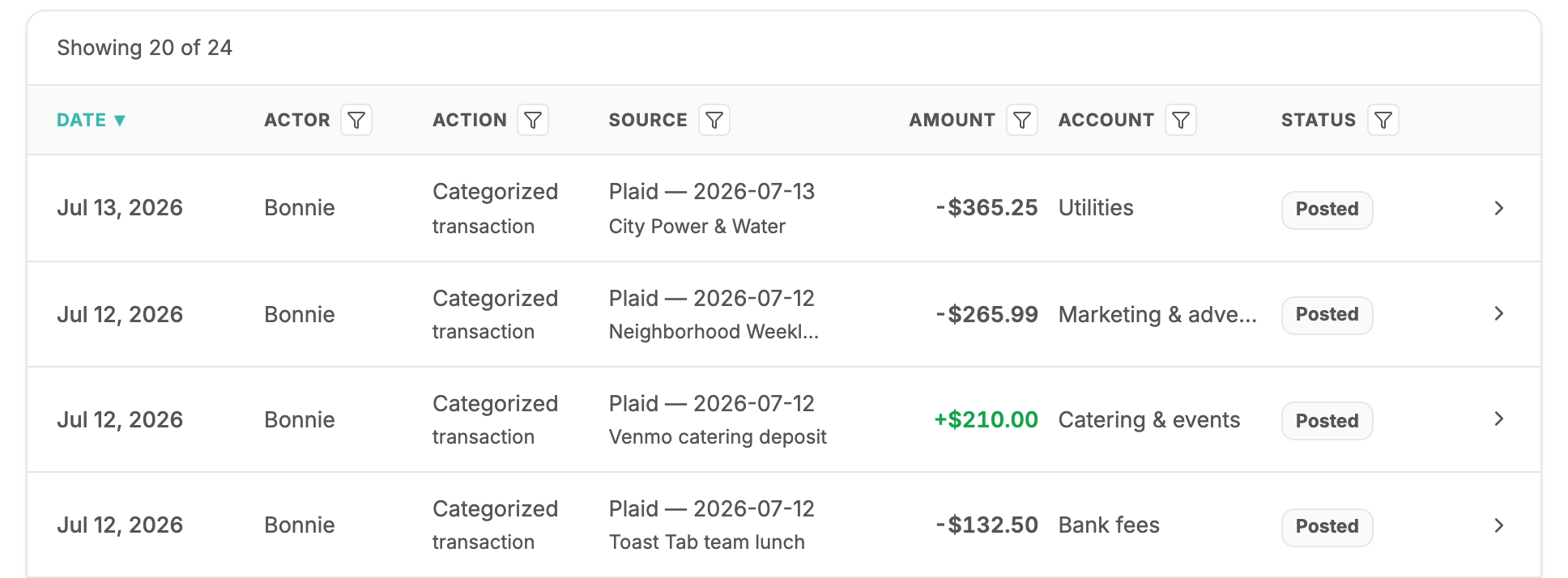
The audit log records each categorization and change — the date, who did it, the source, the amount, and the account — and any entry opens to the exact details behind it.

Questions become visible context.

When Bonnie needs your judgment, she asks a narrow question and keeps your answer with the records. Six months later you can still see why something was categorized the way it was.

You decide what to review and share.

Open your P&L any time and export to CSV or PDF. Disconnecting a bank never deletes the transactions already in your books — removing history is a separate, explicit choice that's always yours.

Bonnie's audit log listing each action with its date, actor, source, amount, account, and posted status — every categorization on the record
The audit log: every action, its source, and its status — nothing off the record. From Bonnie's live demo — sample books for a harborside lobster shack. Try it yourself at mybonnie.ai/demo.

PRIVACY QUESTIONS

Trust also means knowing what to ask

Financial data deserves careful handling — from any tool, not just Bonnie. Before connecting accounts anywhere, ask: Who can access this data? How are account connections and uploaded documents used? What can I export, and what happens if I disconnect? The FAQ below answers each of those for Bonnie specifically.

FAQ

Questions owners ask

Is AI bookkeeping safe for every business?

Bonnie is designed for small-business bookkeeping where source documents, owner review, and focused questions keep the work inspectable — and everything she does is visible in the audit log and expandable P&L. Businesses with complex or heavily regulated books may also need professional support alongside any software.

How does Bonnie keep bookkeeping reviewable?

Three ways you can check yourself: every P&L line expands to its transactions and documents, every action is recorded in the audit log with its source and details, and every ambiguous item becomes a question whose answer stays on the record.

How is my financial information stored?

When you connect a bank or card account, Bonnie uses Plaid to make the connection. Plaid handles the bank login step and sends Bonnie the financial data you authorize Bonnie to use for bookkeeping.

  1. 1You choose the accounts

    You pick the bank or card accounts you want Bonnie to use for bookkeeping.

  2. 2Plaid makes the connection

    Plaid securely connects to your financial institution and shares authorized data with Bonnie.

  3. 3Bonnie stores bookkeeping records

    Bonnie stores imported transactions, account labels, last digits, categories, review notes, and an encrypted Plaid access token.

  4. 4You can disconnect later

    You can disconnect linked accounts in Bonnie. Plaid also provides Plaid Portal for managing Plaid-held data.

Bonnie does not store your bank username or password.

What happens if I disconnect a bank?

Your books stay intact. Disconnecting stops new imports but never deletes the transactions Bonnie already recorded — your P&L history is preserved. Removing imported history is a separate, explicit action you'd have to choose deliberately.

What should I ask before connecting financial data to any tool?

Who can access the data, how account connections and uploaded documents are used, what you can export, what happens when you disconnect, and whether every automated action is visible somewhere you can check. If a tool can't answer those plainly, that's the answer.
Ready for cleaner books?

Start with Bonnie and turn bank activity, receipts, statements, and owner context into bookkeeping you can review.

Get started